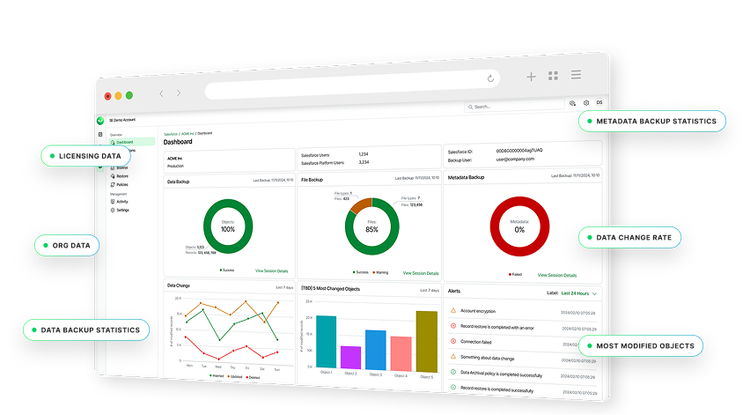
VEEAM DATA CLOUD FOR SALESFORCE
Salesforce backup and recovery
- Effortless, customizable backup and fast recovery
- Three-layer encryption & immutability
- Simple, inclusive pricing with unlimited storage


BENEFITS
What Veeam Data Cloud for Salesforce does
More than just a backup
Your Salesforce data, your responsibility. Secure your Salesforce environments with Veeam Data Cloud, a single cloud platform from the industry leader that unifies resilience for all SaaS apps and data.
Purpose-built for Salesforce
Veeam Data Cloud simplifies data protection, security, and recovery to keep your business running. Plus, its advanced data management and monitoring features help you maintain compliance with confidence while reducing TCO.

Salesforce Shared Responsibility Model
See where Salesforce's responsibility ends and yours begins.

Eliminate downtime
Automated, high-frequency backups keep your Salesforce data current, so you don't have to think about it.
Mitigate data risk
Access control, encryption, and masking keep sensitive records protected, even when they're in a sandbox.
Unlock business value
Archiving and unlimited storage free up budget, so you're not paying to keep old records in Salesforce.
See It In Action
See Salesforce backup and recovery live
Walk through a real workflow in five steps: set a backup policy, find lost records, compare and restore, seed a safe sandbox, and manage multiple orgs from one console.

CAPABILITIES
Salesforce backup capabilities
From daily backups to sandbox seeding, Veeam Data Cloud for Salesforce covers the workflows you rely on every day.
Data Archiving
Archive without losing access
Archive any record/object out of active storage
Move aging records out of active Salesforce storage while keeping them backed up, searchable, and restorable, so you meet retention rules without paying for storage you rarely touch.
Access Controlled
Control who can restore what
Limit restores to your Salesforce admins
Control who can see and restore what, with role-based access control, multi-factor authentication, and single sign-on tied to your existing identity provider.
Frequent Scheduling
Back up on your own cadence
Run opportunity backups more often than accounts
Set backup frequency down to the object level, so high-churn objects like opportunities run more often than reference data. No extra cost for more frequent runs.
Unlimited Storage
No need to prioritize budgets over compliance
Keep every backup as record volume grows
Every plan includes unlimited backup storage, so growing record volumes don't change your bill and you never prune backups to stay under a cap.
Encryption
Encrypted in production, encrypted in backup
Extend Salesforce Shield to your backup copy
Extend Salesforce Shield encryption to backup data at rest, so data that's encrypted in production stays encrypted in the backup copy.
Granular Restore
Restore a field, not the whole org
Recover one deleted account with its contacts
Compare a backup against live data, then restore individual records, fields, or whole objects, with parent-child relationships and lookups kept intact.
Sandbox Seeding
Seed sandboxes with real data
Refresh a dev sandbox before a release
Seed sandboxes with production-fresh records for dev, test, and training, without a manual export and import cycle.
Data Masking
Realistic data, masked PII
Mask contact emails before a sandbox refresh
Mask sensitive fields before data reaches a sandbox, so developers and testers work with realistic records instead of live customer PII.
Multi-Org Management
Every org from one console
Apply one retention policy across all orgs
Manage backup policies, retention, and restores for every Salesforce org from one console, instead of logging into each org separately.
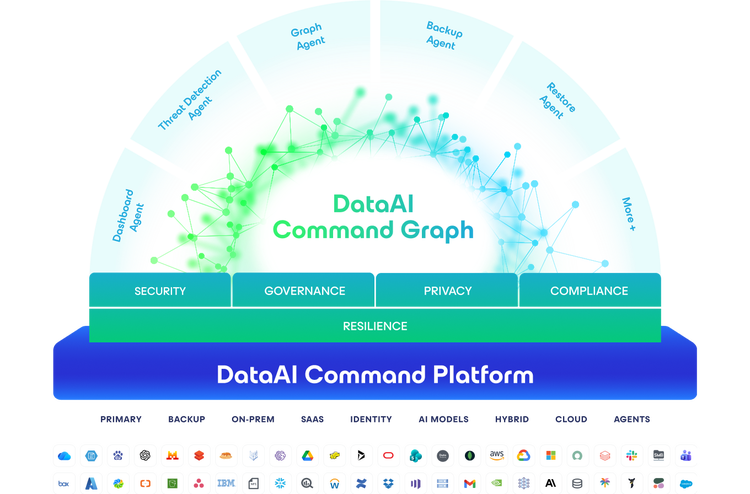
DATAAI COMMAND PLATFORM
See everything. Recover anything.
PRICING & EDITIONS
Salesforce backup plans
Choose the level of protection that fits your Salesforce environment, from single-org backup to coverage across Microsoft 365 and Microsoft Entra ID.
Veeam Data Cloud for Salesforce
Advanced Plus
Premium Plus
All prices may vary by region, and are available through resellers in local currencies.
Advanced Plus and Premium Plus tiers also cover Microsoft Entra ID.
DOCUMENTATION
Explore Salesforce Backup Resources
Salesforce Backup Risks & How Veeam Secures Your Data
9 Reasons to Back Up Salesforce
Next Steps
Trust starts with your data
Recommended for you
Product Tour
Data & AI Trust, unified under one intuitive yet powerful SaaS platform.
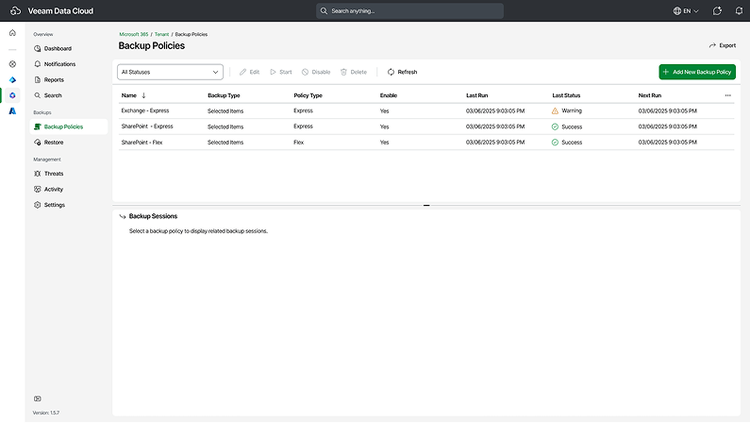
FAQ