- Veeam Support Knowledge Base
- My Account Portal - Role Management FAQ
My Account Portal - Role Management FAQ
| KB ID: | 2211 |
| Published: | 2016-12-28 |
| Last Modified: | 2025-11-07 |
| Languages: | JP |

Cheers for trusting us with the spot in your mailbox!
Now you’re less likely to miss what’s been brewing in our knowledge base with this weekly digest

Oops! Something went wrong.
Please, try again later.
Veeam Support is unable to modify or assign the Case Administrator role.
The Case Administrator role can only be assigned by the License Administrator associated with the given Support ID.
Below are the most commonly asked questions.
What is a Case Administrator?
A Case Administrator is a role designated to an individual by a License Administrator, authorizing that individual to create and manage cases on behalf of a company. These individuals can be company employees, resellers, or third-party contractors whom the company has granted the authority to create and manage support tickets associated with the company's support license.
It's important to note that while Case Administrators are able to manage support tickets, they do not have the ability to manage or alter the actual support licenses themselves. This responsibility rests solely with the License Administrator, a separate role with the authority to manage the licenses and assign the Case Administrator role as needed.
What can a Case Administrator do?
- Case Administrators can open, update, and close support cases for the licenses they are assigned to.
- Case Administrators can also manage cases created by the License Administrator and other Case Administrators.
- Case Administrators belonging to the same company can view other licenses but cannot manage them.
- Case Administrators cannot view and manage other Case Administrators.
How do I assign a Case Administrator?
You must be logged in as the License Administrator to manage Case Administrators for your company's support contracts. Once logged in to the Veeam My Account Portal as the License Administrator, you can access the "Case administrators" section.
Note: The Case administrators section will only be visible when logged in as the License Administrator.
Case Administrator Creation
- Open the Case administrators page.
- Click the CREATE CASE ADMINISTRATOR button.

- Specify the Business email of the person you wish to add as a Case Administrator.
- The Name and Company will be prefilled if the email provided is associated with an existing portal account.
- If there is no portal account related to the provided email, you must provide a name and company name.
- After verifying the information, click Next.

- Select the Support contracts which will be assigned to the new Case Administrator.
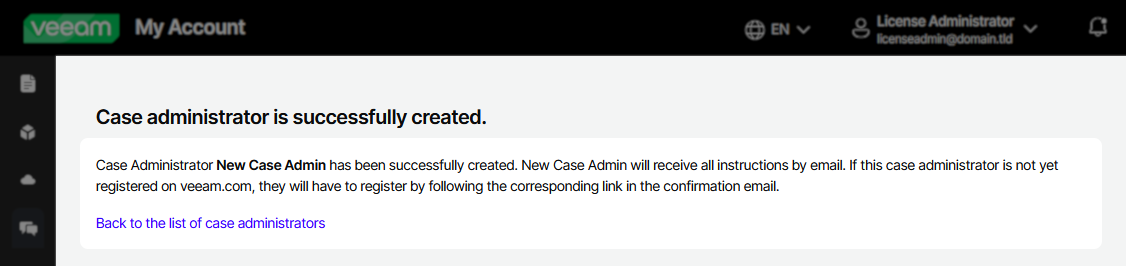
- Click Save to complete the case administrator creation.



How do I become a Case Administrator?
Only the License Administrator of a Support License (ID) can assign the Case Administrator role. Contact the License Administrator directly and request that they designate you as a Case Administrator.
Review the How to Determine License Administrator section below for assistance in determining who the License Administrator is.
What is the maximum number of Case Administrators I can assign?
How do I remove a Case Administrator?
There are two options:
- Unassign the Case Administrator from a specific Support Contract
- Remove the Case Administrator entirely
To unassign a Case Administrator from a specific Support ID:
- Go to the Case administrators page.
- In the "License view," click the X next to the Case Administrator's entry under the specific Support ID#.

Note: This option is unavailable if the user is the License Administrator.

How to Determine License Administrator
To view the Production Licenses and identify what email is assigned as the License Administrator, please click here: https://my.veeam.com/licenses/production
It is also possible to see the License Administrator information in the License Information panel inside Veeam Backup & Replication.

How to Change License Administrator
If you have lost access to the License Administrator account or want to change who is assigned as the License Administrator, please create a licensing case.
When requesting a License Administrator change, please include the email of the new License Administrator.
Note: If you are not a Case Administrator for the Support ID whose License Administrator you are attempting to change, leave the Support ID field blank.

| Feature / Function | Case Administrator | License Administrator |
|
Role Management | ||
| Assign Case Administrator Role | ||
| Case Management | ||
| View Cases | ||
| Create Cases | ||
| Product License Management | ||
| View Product Licenses | ||
| Download Product Licenses | ||
| Merge Product Licenses | ||
| Veeam Data Cloud (VDC) Management | ||
| Register Veeam Backup Server | ||
| Purchase VDC Vault | ||
| Manage VDC Vault | ||
Related Articles
- Veeam Account Sign In FAQ
- How to Create a Veeam Account
- Veeam My Account Portal - MFA Guide
- My Account Portal "Recovery email for case contact" Guide
- My Account Portal - Role Management FAQ
- How to Create a Veeam Support Case
- My Account Portal: "No licenses can be found for your account"
- How to Attach Files to a Veeam Support Case
- How to Attach a File Larger Than 5GB to a Support Case
- How to Generate an SFTP Account for a Support Case
- How to Contact Veeam Support Management
- Support Partners Case Management
If this KB article did not resolve your issue or you need further assistance with Veeam software, please create a Veeam Support Case.
To submit feedback regarding this article, please click this link: Send Article Feedback
To report a typo on this page, highlight the typo with your mouse and press CTRL + Enter.
