
Backup for Microsoft 365
- Leader in Microsoft 365 backup with 25M+ users protected
- Backup Exchange, SharePoint, OneDrive, Teams and Entra ID
- All-inclusive backup service with unlimited storage

Benefits
Market-Leading Microsoft 365 Backup Solution
When data is deleted or goes missing, it leads to business disruption, security vulnerabilities, and compliance exposure. Protecting and recovering your Microsoft 365 data is your responsibility. It is simply too important.
Veeam Data Cloud for Microsoft 365 is the leading Microsoft 365 backup solution, delivering reliable backup and lightning-fast recovery for Exchange, SharePoint, OneDrive, Entra ID, and Teams, including the emails, files, sites, and conversations that Microsoft Copilot and AI agents rely on.
Stay in control as your organization grows and attackers change tactics. Recover fast from accidental deletions, retention gaps, and ransomware, so one bad day doesn't become a business outage.
Veeam is the only preferred platinum partner for Microsoft 365 Backup.

Trusted & Industry-Leading
Modern, Secure, & Intuitive
Everything is Included
Microsoft 365 Backup is Critical;
Data Loss is Common
-
Growing Data Risk31%
expected growth in data over the next 12 months
-
Cyber Loss Risk23%
of downtime and data loss is caused by issues like ransomware
-
Costly Comebacks35%
say a data loss incident took significant effort to recover from
Source: Voice of the Enterprise: Storage, Disaster Recovery 2026 by 451 Research
Why Backup Microsoft 365?
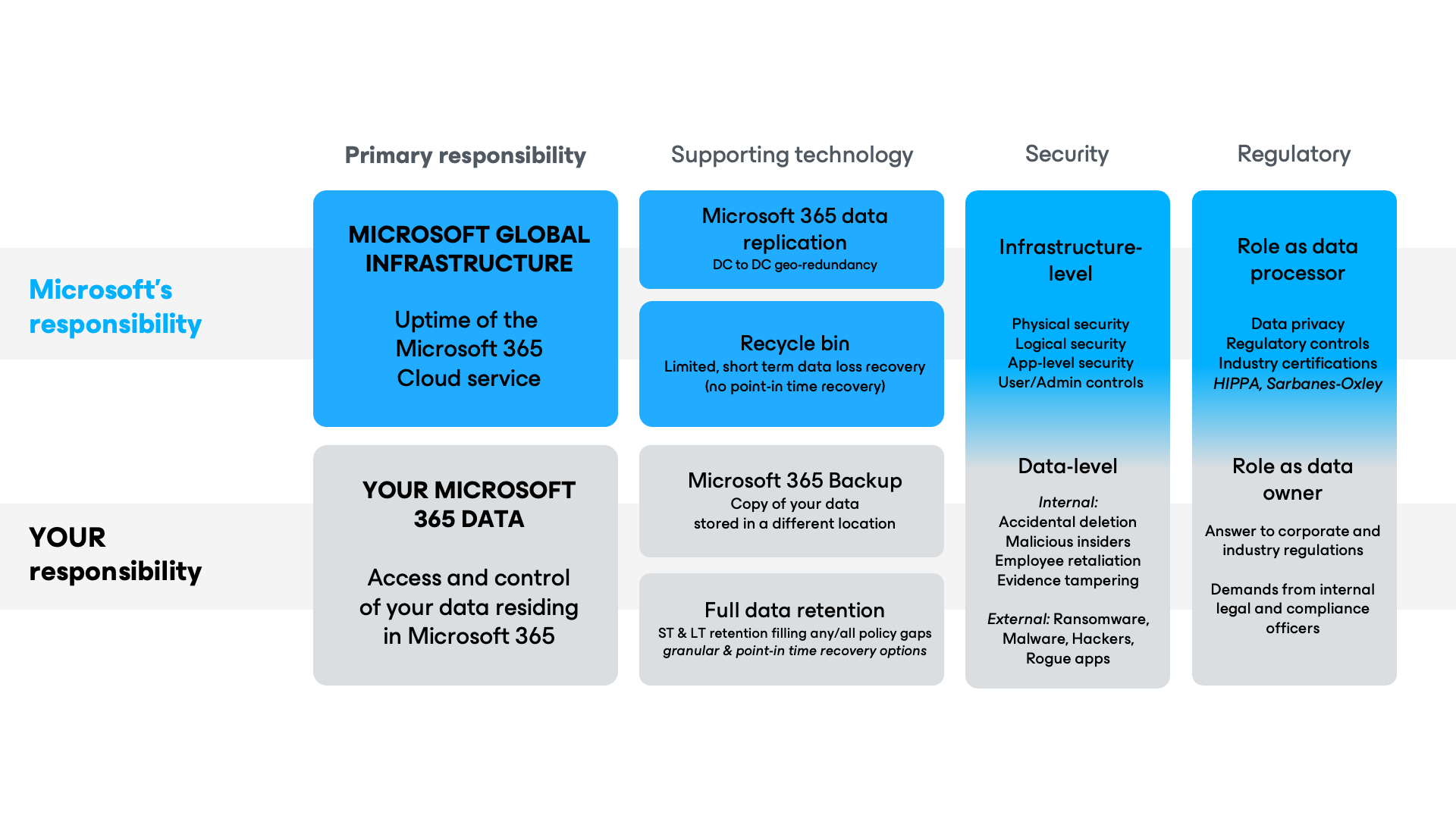
Microsoft 365 Backup is your responsibility
The Microsoft 365 Shared Responsibility Model clearly states that you, not Microsoft, are responsible for your organization's Microsoft 365 data.
Microsoft’s primary responsibility is to provide near-perfect uptime of its cloud service. They have replication, geo-redundancy, and security measures built in to achieve it. Don’t mistake this for backup. Only independent, secure copies of your data deliver true peace of mind, protecting you as the data owner.
Total control. Direct Access. Fast Recovery.

7 Reasons to Backup
Microsoft 365
Over a decade in Microsoft 365 backup shows one truth: a lot can go wrong to Microsoft 365 data. Some threats are targeted and destructive. Others are honest and accidental. But it’s all a problem.
This 5-minute, easy-to-read special report summarizes the 7 most common Microsoft 365 data loss scenarios.
Data loss isn’t if ─ it’s when. Expect disruption. Or get protected now and backup for what’s next.
Broad protection for Microsoft 365 data
-

Exchange Online
Protect every mailbox, folder, email, task, calendar, and contact in Exchange Online, and restore exactly what you need.
-

SharePoint Online
Back up SharePoint Online sites, libraries, lists, and documents, then recover a single item or an entire site.
-

OneDrive for Business
Keep OneDrive for Business folders, documents, and OneNote files safe, and leverage multiple restore options when needed.
-

Microsoft Teams
Back up public, private, org-wide and archived teams, plus public, private and shared channels, with posts, tabs, files, settings and memberships.
-

Microsoft Entra ID
Back up and restore Microsoft Entra ID users, groups, application registrations, and other related objects, so your identities are recoverable too.
Capabilities
Powerful Microsoft 365
Backup Capabilities
available in either a backup service or self-managed backup software.
Microsoft 365 Backup Made Simple
Secured and Deployed for You
Lightning-Fast Backups and Restores
Ransomware Recovery
Data Sovereignty
Entra ID Backup Support
Enhanced Security
Advanced Search
Advanced Threat Detection
How it works
Experience Microsoft 365 Backup in Action
Pricing And Packaging Options
Microsoft 365 Backup Plans
You can bundle Microsoft 365 backup with Entra ID for extra savings. All plans including both are priced per Microsoft 365 user, and all Microsoft 365 users must be protected.
It is common to have more Entra ID users than Microsoft 365. Any additional Entra ID users are FREE within the 3X Fair Use Policy. Veeam only counts Entra ID enabled member users, not all Entra ID users.
For example: 10k Microsoft 365 users covers up to 30K Entra ID enabled member users.
Compare plans
per user / month billed annually
per user / month billed annually
per user / month billed annually
Data Resilience for Microsoft 365
Everything in Foundation, plus Entra ID Data Resilience
Everything in Advanced,plus Microsoft 365 Disaster Recovery
*The price for this plan is represented as volume discount for 251+ users.
**The price of Veeam Data Cloud for Microsoft Entra ID Standalone is $1.08 USD, and when purchased together in the Advanced Plan is allocated to $.70 (35% off Entra ID).
Add-on for Veeam Data Cloud for Microsoft 365
Veeam Intelligent ResOps for Microsoft 365
Minimize compliance overhead
Accelerate AI safely
Reduce storage costs
Drive minimum viable recovery
Protect More Workloads for Less
Ask us about bundling Microsoft 365, Entra ID, and Salesforce
protection for extra savings

Looking for Backup Software?
Veeam offers a highly customizable self-managed Microsoft 365 backup software, allowing you to connect any storage, whether on-premises or cloud object.
Looking for Managed BaaS & DRaaS?
Utilize the expertise of a Veeam Cloud & Service Provider Partner to safeguard Microsoft 365 and public cloud data, or for your off-site backup and DRaaS requirements.
The Most Trusted Brands
Choose Microsoft 365 Backup with Veeam


Resources
Microsoft 365 Backup
Resources are Just a Click
Away

7 Critical Reasons for Microsoft 365 Backup
Microsoft 365 Backup for Dummies
8 Benefits of a Microsoft 365 Backup Service
The Two Pillars of Microsoft 365 Data Resilience
Check Out What Our Microsoft 365 Customers are Saying


The Coca-Cola Bottling Company of Saudi Arabia

FAQs for Microsoft 365 Backup
Does Microsoft 365 already back up my data?
Although the market perception is shifting, it is still a common misconception to think that Microsoft automatically backs up all your Microsoft 365 data inherently within the cloud service you purchased. Microsoft provides great resiliency and built-in tools for all types of capabilities, but they do not provide a comprehensive backup solution within Microsoft 365 plans.
There is a Microsoft 365 Shared Responsibility between what is provided within the Cloud Service, and the responsibility of organizations to protect their own Microsoft 365 data. Check out our blog about how Microsoft 365 Shared Responsibility works.
How can you backup your Microsoft 365 data?
How does Veeam back up Microsoft Teams data?
What is the standard retention policy in Microsoft 365?
Retention for deleted Microsoft 365 data can vary by the application. For instance, an Exchange Online mailbox keeps deleted items for 14 days by default, but this setting can be changed up to 30 days. When using the SharePoint Online application within a browser, items deleted are retained in the Recycle Bin for 93 days from the time of deletion.
When an employee leaves an organization, their Microsoft account can be removed. Their user data will be deleted after 30 days and will no longer be available unless you have that data saved in a backup solution.
It’s worth noting that retention policies can take time to set up correctly, and data loss can and does occur due to human error during retention policy configuration. So, it’s vital to have a backup of Microsoft 365 data as an insurance policy.
How many Microsoft 365 users should I backup?
What counts as a “user”?
To calculate the number of licenses you need for Veeam Data Cloud for Microsoft 365 or Veeam Backup for Microsoft 365, count the number of users within your Microsoft 365 subscription. You do not need to count the same user more than once across multiple Microsoft 365 services (e.g., the same Exchange Online, SharePoint Online and OneDrive for Business user = one Veeam Backup for Microsoft 365 user).
Here are additional details for each Microsoft 365 service:
Exchange Online or Exchange On-Premises: A user mailbox can be a personal mailbox, an online archive mailbox or both; you only need one license for that user. Please note that shared and resource mailboxes do not need to be licensed and can be backed up free of charge.
OneDrive for Business: OneDrive for Business user licenses are automatically aligned with their matching email accounts. This means you cannot use the same license to back up one user’s email and another user’s OneDrive for Business account. Please note that OneDrive (without “for Business”) is a separate storage service and is not supported by this solution.
SharePoint Online or SharePoint On-Premises: Each SharePoint user inside your Microsoft 365 subscription (or on-premises deployment) that has been granted access to the SharePoint sites you are looking to protect needs to be licensed to back up and protect your organization’s SharePoint environment. If you have a hybrid SharePoint deployment (i.e., SharePoint On-Premises and SharePoint Online) and the same user has access to both, only one Veeam license is needed for that user. Please note that external SharePoint users do not need to be licensed. An external SharePoint user is someone from outside your Microsoft 365 subscription to whom you have given access to one or more sites, files or folders. External authenticated users are limited to basic collaboration tasks and external anonymous users can edit or view specific documents when given specific permissions.
Microsoft Teams: When protecting a team with Veeam Backup for Microsoft 365 or Veeam Data Cloud for Microsoft 365, you must have a license for each user that is an active team member and who has a paid Teams license in Microsoft 365.
Why should I use Veeam instead of Microsoft’s first-party backup solution (Microsoft 365 Backup Storage)?
What is Veeam Data Cloud for Microsoft 365?
How does Veeam Data Cloud for Microsoft 365 work?
Is Veeam Data Cloud for Microsoft 365 secure?
Veeam takes a zero-trust approach to ensure the security of your data, including but not limited to encrypting data in transit and at rest, always using multi-factor authentication, and having strict security controls for users and administrators.
Veeam Data Cloud for Microsoft 365 includes service-level immutability capabilities on the primary backup, at no additional cost to the customer, based on how the data is protected.
The backup data lives in a virtually air-gapped location, isolated and decoupled from the Microsoft 365 and/or customer infrastructure.
Customers also benefit from the inherent data security provided by Microsoft Azure at the storage level.
Once the data is backed up, it cannot be altered, tampered with, or deleted by users, including administrators or attackers. Veeam Data Cloud uses local redundant storage (LRS), where three copies of customer data are stored in three separate disks within the primary Azure region
What can I backup with Veeam Data Cloud for Microsoft 365?
How do I access the Veeam Backup Service?
What Security Certifications does Veeam adhere to?
You can learn more about Veeam’s fundamental principles and security capabilities within the security section of the user guide.
https://helpcenter.veeam.com/docs/vdcm365/userguide/security.html
Where is my data in Veeam Data Cloud for Microsoft 365 stored?
Veeam Data Cloud utilizes Azure Storage to safeguard your critical Microsoft 365 backup data. Your data residency, regulatory compliance requirements, and performance optimization needs often dictate where your organization’s data can be stored. With Veeam, you can use 17 Azure data center regions, ensuring that you can meet your specific data location requirements.
If you’re an EU customer, you can choose a datacenter location within Microsoft’s EU Data Boundary, ensuring that data stays within Europe and maintains European regulatory standards for data integrity, security, and privacy.
In addition to location choice, Azure Storage offers world-class resiliency and service-level immutability. Veeam Data Cloud provides locally redundant storage (LRS), which is replicated three times within a single data center in the primary region and cannot be altered or deleted. By utilizing Veeam Data Cloud for Microsoft 365 Premium, you can reduce the risk of data loss by meeting the industry standard 3-2-1 rule of data protection best practices with redundant copies of data stored on two separate media and one in a separate location.
What are the Veeam Data Cloud Service Level Agreements (SLAs) for the backup service?
What happens to a user’s backup data in Veeam Data Cloud when they are removed or disabled from Microsoft 365?
Can Veeam Data Cloud protect Microsoft 365 home plans?
Does Veeam have special licensing for education (faculty/student) or limited use (ex. front-line worker) licenses?
Yes, Veeam has special licensing available for faculty/student and front-line worker scenarios that use Microsoft 365 less often and require less storage.
For the education sector, we offer highly competitive pricing of six free students for every paid faculty user, with a starting MSRP of $3.50 per user per month, and a minimum of 10 faculty users per order. Additional discounts may be available upon purchase.
To get a quote specific to your environment please Contact Sales.
What happens to my data if I cancel my Veeam Data Cloud subscription?
How should I choose between plans of Veeam Data Cloud for Microsoft 365?
Is unlimited storage included for every user?
Explore the latest news from Veeam
Trends in Ransomware Protection
View a Demo
Where Data & AI Trust
Converge
for the Agentic Era
Download FREE Trial now


Oops! Something went wrong.
Please, try again later.